

Building a RAG Travel Bot — Part 1: From Text to Searchable Knowledge
I’ve been learning AI engineering in public — no hype, just honest exploration. This is the first post in a series where I build trip-pal, a RAG-powered travel assistant, from scratch. Why a travel assistant? Simple — I wanted to pick a domain that most people can relate to, so you can focus on learning RAG without also having to context-switch into an unfamiliar technical domain.
By the end of this series it will answer questions about destinations, remember your preferences, check real weather, and even email you a full itinerary. But we start simple. In this post, we go from a raw text file to a searchable knowledge base that an LLM (Large Language Models) can actually reason over.
If you’ve ever heard the term RAG thrown around and wondered what it actually means in practice — this is for you.
What problem are we solving?
Large Language Models are very capable, but they have a fundamental limitation: their knowledge is frozen in time. The model was trained on data up to a certain date, and it has no idea what’s in your documents, your database, or any information that didn’t make it into its training data.
Ask an LLM “what are the best neighborhoods to stay in Stockholm?” and it will give you an answer — but that answer comes purely from its training data. It might be outdated. It might be confidently wrong. And you have no way of knowing which.
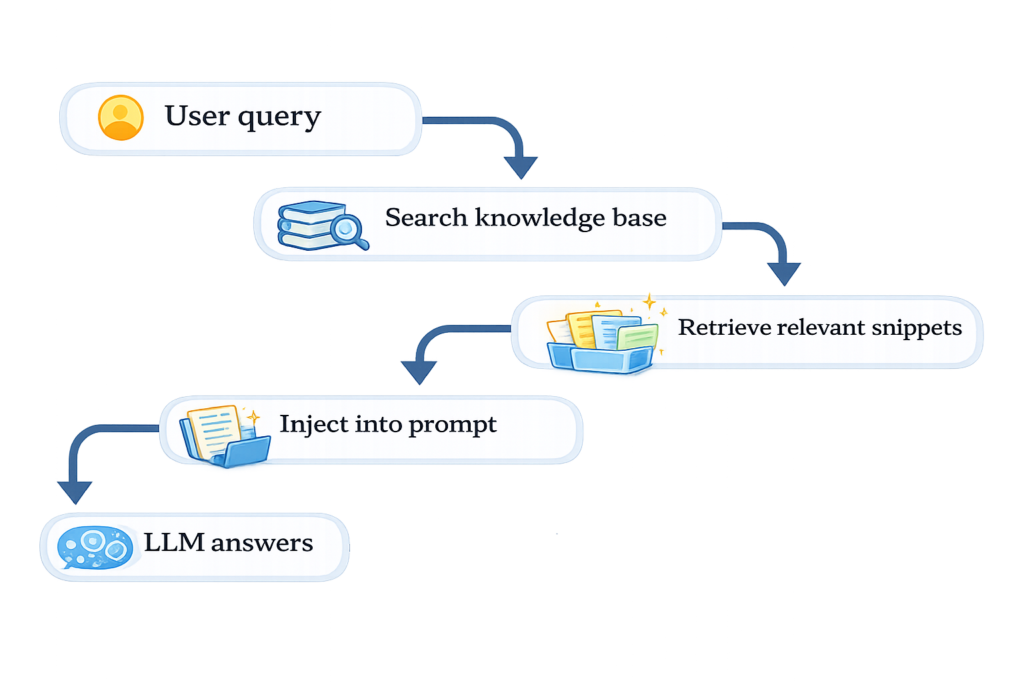
RAG (Retrieval-Augmented Generation) solves this in a surprisingly simple way: instead of relying on the model’s memory, we retrieve relevant information first and then pass it to the model as context. The model answers based on what we give it, not just what it remembers.
The flow looks like this:
What we’re building?
trip-pal is a travel assistant that answers questions about destinations based on real travel guides. In this first phase, we’ll build the foundation:
- loading a travel guide
- processing it into searchable chunks
- converting those chunks into embeddings
- storing everything in a vector database
For Part 1 we’ll use a Stockholm travel guide as our data source — the same approach works for any destination.
By the end of this post you’ll have a working bot you can ask questions like:
- “What are the best neighborhoods to stay in Stockholm?”
- “What should I know about getting around Stockholm city?”
- “What are the must-see attractions?”
And it will answer based on the actual travel guide — not just whatever LLM remembers from training.
The tech stack
- Python 3.13
- LangChain — for chaining LLM operations together
- ChromaDB — a vector database that stores our searchable knowledge
- OpenAI API — for embeddings and generating answers
- python-dotenv — for managing API keys safely
The only cost involved is the OpenAI API. For a learning project like this you’re looking at a few cents. Set a hard spending limit in your OpenAI dashboard before you start — $2 should be more than enough.
The project structure
Before writing any code, set up a clean structure. Create a folder called trip-pal with this layout:
trip-pal/
├── data/               # travel guide documents go here
├── src/                # our Python code
├── .env                # API keys — never commit this!
├── .gitignore
├── requirements.txt
└── README.md
Create a virtual environment and activate it:
python -m venv venv
source venv/bin/activate  # Mac/Linux
Install the dependencies:
pip install langchain langchain-community langchain-chroma langchain-openai langchain-text-splitters openai python-dotenvFreeze them to requirements.txt:
pip freeze > requirements.txtMake sure your .gitignore includes:
venv/
.env
data/chroma/
The .env file contains your secrets — it should never be committed to Git. The venv/ folder contains thousands of library files that anyone can recreate with one command. And data/chroma/ is the generated vector database — no need to version control that either.
Getting the travel guide
We’re using Stockholm as our destination. The reason? Wikivoyage — a free, open travel wiki — has a rich, well-structured guide for Stockholm with sections on neighborhoods, attractions, food, transport and more. It’s exactly the kind of structured content that works well for RAG.
Go to en.wikivoyage.org/wiki/Stockholm?action=raw to get the raw text version. Save it as data/stockholm-guide.txt.
Step 1: Loading and chunking the document
Create src/ingest.py. This script is responsible for loading the travel guide and splitting it into chunks.
Why chunks? The full document is too large to send to the LLM in one go. Instead we split it into smaller overlapping pieces. When a question comes in, we only retrieve the most relevant chunks — not the whole guide.
from langchain_community.document_loaders import TextLoader
from langchain_text_splitters import RecursiveCharacterTextSplitter

loader = TextLoader("data/stockholm-guide.txt")
documents = loader.load()

text_splitter = RecursiveCharacterTextSplitter(chunk_size=700, chunk_overlap=80)
texts = text_splitter.split_documents(documents)

print(f"Number of chunks: {len(texts)}")
A few things worth understanding here:
- chunk_size=700 — each chunk is roughly 700 characters, about a paragraph. Big enough to hold meaningful context, small enough to be precise.
- chunk_overlap=80 — chunks overlap by 80 characters. This prevents information that spans a chunk boundary from getting lost.
- RecursiveCharacterTextSplitter — tries to split on natural boundaries like paragraphs and sentences before resorting to arbitrary character cuts.
Run it and you should see something like:
Number of chunks: 260260 chunks from one travel guide. Each one is a focused, context-rich piece of text about Stockholm.
Step 2: Embeddings and storing in ChromaDB
Chunks alone aren’t searchable by meaning — they’re just text. To enable semantic search we need to convert each chunk into an embedding: a list of numbers that represents its meaning in a way a computer can compare and measure.
Here’s the intuition: two chunks about “restaurants in Södermalm” will have similar numbers. A chunk about “getting to the airport” will have very different numbers. ChromaDB stores these numbers and lets us find the closest matches to any query.
Update src/ingest.py to add the embedding and storage step:
from langchain_community.document_loaders import TextLoader
from langchain_text_splitters import RecursiveCharacterTextSplitter
from langchain_openai import OpenAIEmbeddings
from langchain_chroma import Chroma
from dotenv import load_dotenv

load_dotenv()

loader = TextLoader("data/stockholm-guide.txt")
documents = loader.load()

text_splitter = RecursiveCharacterTextSplitter(chunk_size=700, chunk_overlap=80)
texts = text_splitter.split_documents(documents)

embeddings = OpenAIEmbeddings()
vectorstore = Chroma.from_documents(texts, embeddings, persist_directory="data/chroma")

print(f"Stored {len(texts)} chunks in ChromaDB")
load_dotenv() reads your .env file and makes your OPENAI_API_KEY available to the script. Without it, the OpenAI calls would fail.
Run it:
python src/ingest.pyThis will call the OpenAI embeddings API — it costs a few cents for 260 chunks. You’ll see:
Stored 260 chunks in ChromaDBA data/chroma/ folder will appear with the vector database files inside. Your knowledge base is ready.
Step 3: Asking questions
Create src/query.py. This is the part that actually answers questions.
from langchain_chroma import Chroma
from langchain_openai import OpenAIEmbeddings, ChatOpenAI
from langchain_core.prompts import ChatPromptTemplate
from langchain_core.output_parsers import StrOutputParser
from langchain_core.runnables import RunnablePassthrough
from dotenv import load_dotenv

load_dotenv()

embeddings = OpenAIEmbeddings()
vectorstore = Chroma(persist_directory="data/chroma", embedding_function=embeddings)

llm = ChatOpenAI(model_name="gpt-3.5-turbo", temperature=0)

prompt = ChatPromptTemplate.from_template("""
Answer the question based only on the following context:
{context}

Question: {question}
""")

retriever = vectorstore.as_retriever()

chain = (
    {"context": retriever, "question": RunnablePassthrough()}
    | prompt
    | llm
    | StrOutputParser()
)

question = "What are the best neighborhoods to stay in Stockholm?"
result = chain.invoke(question)
print(result)
Let’s break down what this chain does, step by step:
- retriever takes your question, converts it to an embedding and finds the most similar chunks in ChromaDB
- prompt formats those chunks and your question into a structured message for the LLM
- llm generates an answer — but crucially, only based on the provided context
- StrOutputParser extracts the plain text from the LLM response object
The temperature=0 setting tells the model to be as consistent and factual as possible — no creative embellishment, just grounded answers.
Run it:
python src/query.pyAnd you should get something like:
Based on the provided context, the best neighborhoods to stay in Stockholm would be Södermalm, Vasastan, and Kungsholmen. These neighborhoods offer a variety of bars…
That’s trip-pal answering its first question — grounded in a real travel guide, not just making things up.
Summary
What we’ve built is simple but the concept is powerful. The model isn’t just recalling what it learned during training — it’s reading from a specific, verifiable source and answering based on that. This is how you build AI systems that are reliable rather than just confident.
Remember: hallucinations don’t mean LLMs are useless. They mean we must design systems that assume uncertainty. RAG is one of the most practical ways to do that.
What’s next?
Phase 1 gives us a working Q&A bot but it has no memory — every question is answered in isolation. In Part 2 we’ll add conversational memory so trip-pal can remember things like “I don’t like touristy spots” or “I’m travelling with kids” and use those preferences throughout the conversation.
The full code is on GitHub: https://github.com/C0derSoul/trip-pal